Cell Details
See how every AI-enriched answer was generated — the answer, the reasoning, and the sources behind it.
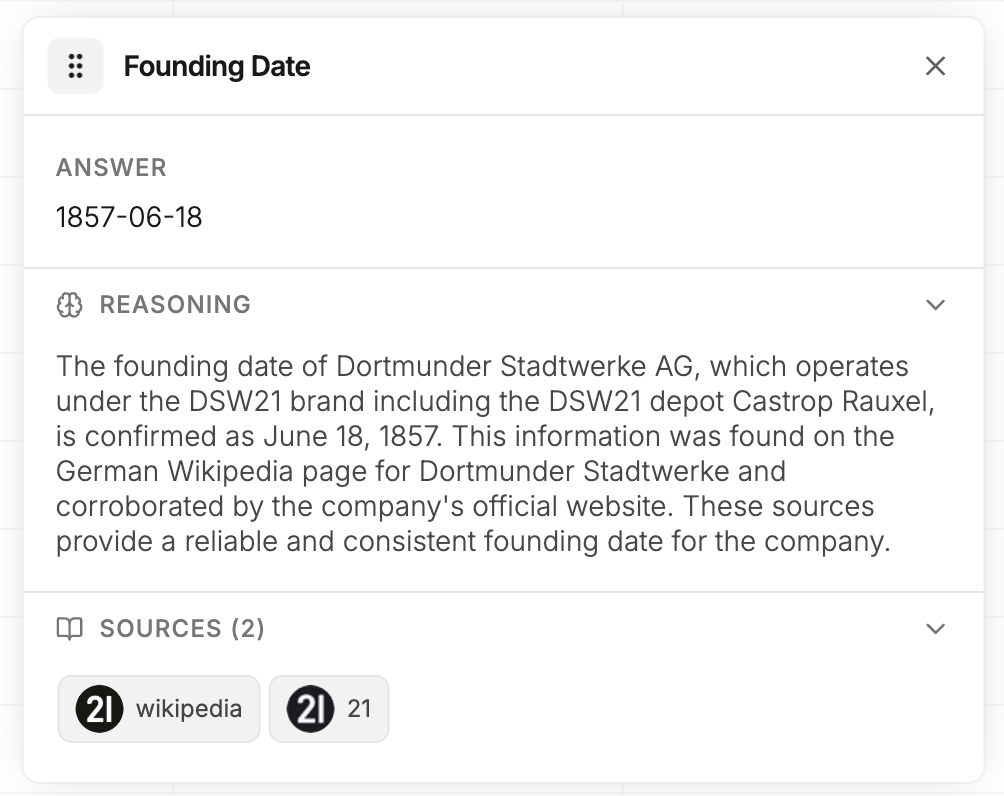
Every enriched cell holds more than an answer — it holds the trail behind it. Click any cell to open its Cell Details panel and see how the AI reached its conclusion, so you can validate the reasoning and check the sources before you trust the data.
What's in the panel
Each enriched cell breaks down into three parts:
Answer
The final result, in plain readable form — the same value shown in your List.
Reasoning
A plain-language explanation of why this is the answer. It shows how the AI interpreted the content it found, cross-referenced details, and landed on the result.
Sources
Links to every source the AI pulled from — any public data source (company websites, LinkedIn, public directories, news) plus some private data providers. Click through to verify a result or dig deeper yourself.
Why it matters
- Builds confidence — transparent logic and clickable sources, not a black box
- Saves time — no guessing where a value came from
- Scales trust — spot-check one outlier or audit thousands of rows the same way
Whether you're verifying a single surprising value or sense-checking a batch, Cell Details keep you in control of your data.
Spot something off while reviewing a cell? Right-click it to give feedback — it helps Saleshunt improve future answers. See Cell Feedback.