Creating Signals
Set up a signal to watch your accounts for a change and turn it into outreach.
Signals is in preview. Get in touch if you'd like access.
There are two ways to start a signal — whichever fits what you're doing.
- From a List — select the companies you want to watch, then Actions → Signals → Monitor Signal.
- From Signals — open Signals in the sidebar (your overview of every signal) and click Create Signal. You'll choose the List and rows to watch at the end.
Either way, you land in the same setup.
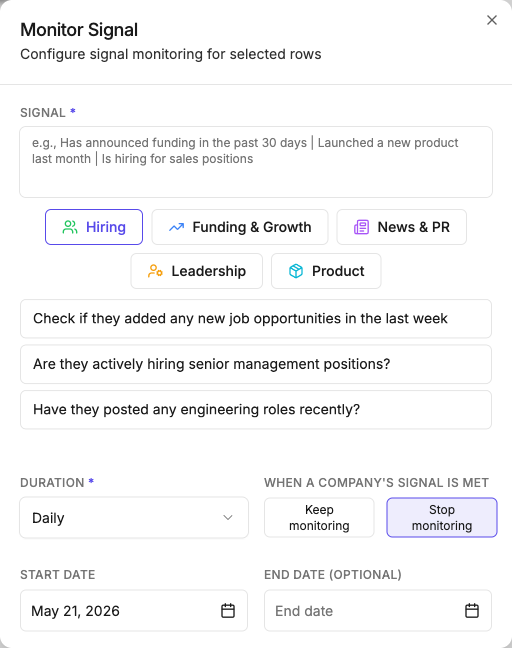
What to set
- Signal — describe the change to watch for, in plain language. Pick a category (Hiring, Funding & Growth, News & PR, Leadership, Product) to see example phrasings, or write your own.
- Duration — how often to check: daily, weekly, bi-weekly, monthly, quarterly, or annually.
- When a company's signal is met — keep monitoring (for ongoing changes like hiring) or stop monitoring (for one-time events like a funding round).
- Start date, and an optional end date — the window to watch over.
Writing a good signal
A signal is only as good as how you phrase it. The same principles that make a Discover search or a Column work apply here.
Make it observable from public data. If you could confirm it yourself by looking online, Saleshunt can watch for it. If it needs insider knowledge, it can't.
Bound it in time. Vague timing produces noise. Don't write "raised funding recently" — write "announced funding in the past 30 days." Match the window to your check frequency: a weekly check pairs well with a "past 7 days" phrasing.
Be specific. "Is something happening?" is too broad. "Is hiring for sales roles" or "launched a new product in the last month" gives the agent a clear, checkable target.
Good: "Has announced a new funding round in the past 30 days." Too vague: "Is growing."